
Intro
In the last CoreWeave post we ran vLLM on a single GPU box with mid-sized models (70-125B). DeepSeek-V3.2, on the other hand, doesn’t fit on one box (685B parameters, ~643GB even compressed). But how do you shard a whale this big across nodes and still serve it fast, at low latency, without it falling over?
This post answers exactly that. We do it on CoreWeave: 16× H100s across two nodes with vLLM + KubeRay, along with tensor and pipeline parallelism. The whole stack stands up in one terraform apply
✍🏻CoreWeave is a NeoCloud, built on the idea that AI workloads don’t need virtualization; they need direct access to hardware. Read more on our Inside CoreWeave blog.
📂 Project Structure
💡You can find our code in the CloudThrill repo ➡️ production-stack-terraform.
./
├── cluster-tools.tf          # Cert-manager, Traefik, Monitoring, Metrics-server
├── main.tf                   # CKS Cluster & NodePool logic
├── network.tf                # CoreWeave VPC & IP Prefixes (Pod/Svc/LB CIDRs)
├── output.tf                 # Unified Stack Dashboard output
├── provider.tf               # CoreWeave, Helm, & Kubectl provider config
├── variables.tf              # Configurable knobs & defaults
├── vllm-production-stack.tf  # vLLM Helm release + KubeRay logic
├── env-vars.template         # Environment variable boilerplate
├── terraform.tfvars.template # Terraform variable boilerplate
├── config/
│   ├── helm/
│   │   └── kube-prome-stack.yaml
│   ├── llm-stack/helm/gpu/
│   │   └── gpu-deepseek-v32.tpl          # DeepSeek-V3.2 685B model chart
│   ├── manifests/
│   │   ├── audit-policy.yaml
│   │   ├── letsencrypt-issuer-prod.yaml
│   │   ├── letsencrypt-issuer-stage.yaml
│   │   ├── nodepool-cpu.yaml             # CPU NodePool CRD
│   │   └── nodepool-gpu.yaml             # GPU NodePool CRD
│   ├── vllm-dashboard-oci.json           # per-model inference observability
│   └── vllm-dashboard.json               # vLLM + KV cache observability
└── README.mdThis stack has a single deployment chart, gpu-deepseek-v32.tpl, because it takes two nodes just to serve the model.
Under the Hood📦
This Terraform stack serves DeepSeek-V3.2 on CoreWeave CKS, with vLLM as the engine sharded across GPU nodes:
✅ 685B model sharding : TP=8 + PP=2 across 2 × 8×H100 nodes (16 GPUs total)
✅ CoreWeave CKS native: managed Kubernetes, pre-baked GPU drivers, VAST shared storage
✅ InfiniBand interconnect : Ray’s inter-node link runs over RDMA for low-latency communication
✅ FP8 acceleration : DeepGEMM kernels + FlashMLA for memory-efficient inference
✅ FlashInfer backend : optimized attention for DeepSeek’s MLA architecture
✅ Reasoning support : native <think> tag handling for Chain-of-Thought outputs
✅ IaC deployment : fully automated via Terraform + KubeRay on CoreWeave CKS
🧰Prerequisites
Before you begin, ensure you have the following:
| Tool | Version | Notes |
|---|---|---|
| Terraform | ≥ 1.5.7 | tested on 1.9+ |
| CoreWeave CLI (cwic) | latest | Primary CLI for CKS interaction and Kubeconfig generation |
| CoreWeave provider | 0.10.1 | Native provider for CKS clusters and NodePool orchestration. |
| kubectl | ≥ 1.31 | ± 1 of control-plane |
Configure CoreWeave CLI profile
Follow the below steps to Install the CwiC (expend)👇🏼
# 1. Download and extract the binary
curl -fsSL https://github.com/coreweave/cwic/releases/latest/download/cwic_$(uname)_$(uname -m).tar.gz | tar zxf - cwic && mv cwic $HOME/.local/bin/
# 2. Authenticate (Interactive)
cwic auth login
# OR Authenticate using a Token
cwic auth login <YOUR_TOKEN> --name "Production"
# 3. Verify Identity
cwic auth whoamiLearn more about cwic commands on my coreweave-blog-post
Architecture Overview

One model, two GPU nodes: TP=8 splits it across the 8 GPUs within each node, PP=2 splits it across the two nodes. That’s why the KubeRay head and worker live on separate nodes, each holds one pipeline stage, joined over InfiniBand.
Note: This multinode build ships one model only, using the following vllm helm chart gpu-deepseek-v32.tpl
🧱 Build stages:
In this DeepSeek build, the model layer dominates; everything else is the same as our previous CoreWeave deployment.
| Layer | Component | Deployment Time |
|---|---|---|
| Infrastructure | Custom VPC/Subnets (Pod/Service/LB CIDRs) + CKS control plane | ~4 min |
| Add-ons | cert-manager, Metrics Server, Traefik ingress, kube-prometheus-stack | ~12 min 57 s |
| CPU Node Pool (Bare metal) | 1-Intel/AMD-Bare-metal Node | ~19 min |
| GPU Node Pool (Bare metal) | 2×(8xH100) Bare-metal Nodes once the CPU-nodepool is stable. | ~15 min |
| vLLM Production Stack | DeepSeek-V3.2 model server + router (multinode load + warmup) | ~59 min |
| Total | End-to-end | ~90 min |
🏗️ Expand for full Infrastructure Stack reference (VPC, CKS, Add-ons, vLLM)
1. 🛜Networking Foundation
The stack creates a production-grade network topology:
| Feature | Configuration | Details |
|---|---|---|
| Load Balancer CIDR | 10.20.0.0/22 | Dedicated prefix for ingress endpoints. |
| Pod CIDR | 10.244.0.0/16 | Massive IP space for high-density GPU scaling. |
| Service CIDR | 10.96.0.0/16 | Internal cluster-IP orchestration. |
| CNI | Native Cilium CNI | eBPF-powered policy enforcement, Overlay (VXLAN), and Hubble flow observability. |
| Ingress | Traefik Controller | Exposed via CoreWeave Load Balancer. |
| SSL Certification | Letsencrypt ClusterIssuer | Encrypts and certifies VLLM and Grafana ingress endpoints. |
2. ☸️CKS Cluster
A Control plane v1.35 with two managed node-groups( The only way to create node pools is via manifests)
| Pool | Instance | Purpose |
|---|---|---|
cpu-pool |
cd-gp-i64-erapids (64 vCPU / 512 GiB) | Intel Emerald Rapids for Core Kubernetes workload |
gpu-pool (based on quota) |
gd-8xh100ib-i128 (8x H100-80GB /128GB RAM) | GPU inference workload |
3. 📦Essential Add-ons
Core CKS add-ons are pre-optimized for AI workloads. We added below K8s addons (deployed after CPU node).
| Category | Add-on | Notes |
|---|---|---|
| Ingress/LB | Traefik Ingress | Integrated with CoreWeave LB |
| Observability | kube-prometheus-stack / metrics-server | Includes GPU-specific DCGM metrics |
| Security | cert-manager | Let’s Encrypt HTTP-01 automation |
| GPU | Pre-baked NVIDIA drivers | No separate GPU operator required |
4. 🧠vLLM Production Stack
The heart of the deployment a production-ready model serving:
✅ Model Serving: DeepSeek-V3.2 across 2 GPU nodes (TP=8 + PP=2) via KubeRay
✅ Request Routing: Round-robin router service
✅ lmcache config: LMCache-backed cache server, baked into the chart (node-local storage)
✅ Storage: Persistent caching under /data/models/ on VAST Data
✅Observability: Prometheus with 2× pre-configured Grafana dashboards (KV cache + inference)
✅ HTTPS router endpoints: Automatic TLS with Let’s Encrypt certificates.
✅ vllm Helm charts: gpu-deepseek-v32.tpl
🖥️ CoreWeave GPU Instance Types Available
From high-density Blackwell clusters to cost-optimized L40S inference nodes. View the full CoreWeave GPU Catalog.
Available GPU instances
| GPU Instance Model | GPU Count | VRAM (GB) | vCPUs | RAM (GB) | Price/h |
|---|---|---|---|---|---|
| NVIDIA GB300 NVL72 | 1 (Rack) | 20,736 | 2,592 | 18,432 | Contact Sales |
| NVIDIA GB200 NVL72 | 1 (Rack) | 13,824 | 2,592 | 18,432 | $42.00* |
| NVIDIA B200 SXM | 8 | 1,536 | 128 | 2,048 | $68.80 |
| RTX 6000 Blackwell | 8 | 768 | 128 | 1,024 | $20.00 |
| NVIDIA HGX H100 | 8 | 640 | 128 | 2,048 | $49.24 |
| NVIDIA HGX H200 | 8 | 1,128 | 128 | 2,048 | $50.44 |
| NVIDIA GH200 | 1 | 96 | 72 | 480 | $6.50 |
| NVIDIA L40 | 8 | 384 | 128 | 1,024 | $10.00 |
| NVIDIA L40S | 8 | 384 | 128 | 1,024 | $18.00 |
| NVIDIA A100 (80GB) | 8 | 640 | 128 | 2,048 | $21.60 |
*Estimated entry price for reserved capacity.
⚙️ Provisioning Highlights
| One-click deployment | 100% automated vLLM stack, zero manual intervention. |
| Zero dependencies | No pre-existing cluster or kubeconfig — built from scratch with just a token. |
| Full add-on suite | Traefik, cert-manager, metrics-server, Let’s Encrypt, Prometheus, Grafana. |
| Smart GPU mapping | Friendly names (H100, B200) → real CoreWeave instance IDs, with AZ validation. |
| Production SSL | Auto-provisioned HTTPS for vLLM & Grafana via Let’s Encrypt: e.g. https://<vllm-prefix>.<org_id>-<cluster>.coreweave.app |
🏁🛑Race Condition Guards
To avoid flaky Terraform applies, the stack includes explicit gates before moving to the next layer:
🐋 DeepSeek Setup (KubeRay)
This build required a dedicated repo because the following components were not present in the original cks-vllm stack.
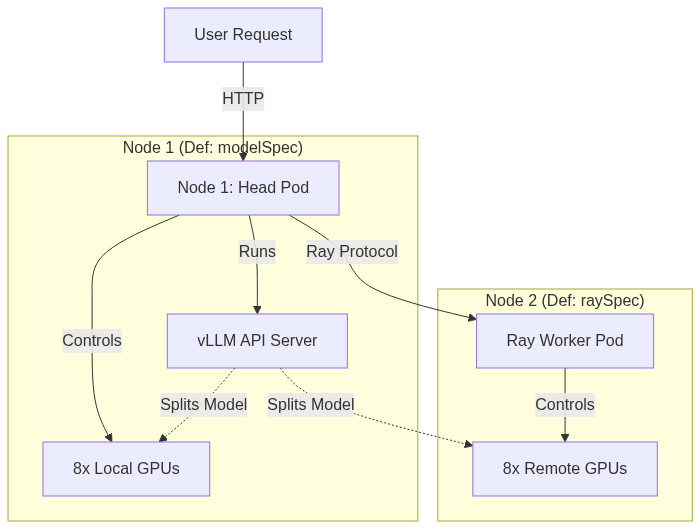
The head runs the vLLM API server and coordinates the worker over the Ray protocol; each holds one pipeline stage on its local 8 GPUs. In config terms, the head is defined in the modelSpec and the worker in the raySpec of the helm chart.
DeepSeek-V3.2 Deployment Chart (production stack):
This stack has a vllm-production-stack chart gpu-deepseek-v32.tpl since it takes two nodes to serve Deepseekv32 🐳
1. KubeRay orchestration (Helm)
Terraform manages the KubeRay Operator and the RayCluster resource as a single unit.
# vllm-production-stack.tf
resource "helm_release" "kuberay_operator" {
  name             = "kuberay-operator"
  repository       = "https://ray-project.github.io/kuberay-helm/"
  chart            = "kuberay-operator"
  namespace        = "kube-system"
  create_namespace = false
  version          = "1.3.0"

  # Automatically manages the 'vllm' namespace and listens for new Ray requests.
  depends_on = [terraform_data.wait_for_cpu_nodes]
}2. The Ray head (defined by modelSpec)
Runs on the master node and coordinates the worker over the Ray protocol. It also sets the FP8 / parallelism tuning:
# vLLM-Production-stack Helm Chart
# ======================================================
# GPU 2-3: DeepSeek-V3.2 (The MoE Titan) head
# ======================================================
modelSpec:
- name: "deepseek-v32-fp8"        # Model
  repository: "vllm/vllm-openai"
  tag: "v0.15.1"
  modelURL: "deepseek-ai/DeepSeek-V3.2"
  requestGPU: 8
  pvcStorage: "800Gi"          # must be > 700GB for DeepSeek-V3.2
  storageClass: "shared-vast"
  pvcAccessMode:
    - ReadWriteMany            # RWX required for multi-node access (PP=2)
  env:
    - name: VLLM_ATTENTION_BACKEND
      value: "FLASHINFER"      # optimized for DeepSeek's MLA architecture
    - name: NCCL_CUMEM_ENABLE
      value: "0"               # stability
    - name: NCCL_IB_DISABLE
      value: "0"               # keep InfiniBand on
  vllmConfig:
    enableChunkedPrefill: true
    enablePrefixCaching: true
    tensorParallelSize: 8      # fits 700GB+ FP8 model across 8 cards
    pipelineParallelSize: 2    # spans the second node
    maxModelLen: 16384
    extraArgs:
      - "--quantization=fp8"
      - "--gpu-memory-utilization=0.92"
      - "--enforce-eager"      # avoids CUDA-graph overhead at high utilization
      - "--tokenizer-mode=deepseek_v32"
- "--distributed-executor-backend=ray"3. The Ray worker (defined by raySpec)
Optimized for CoreWeave H100 with RDMA support. Adds the second node that pipeline parallelism (PP=2) requires:
# vLLM-Production-stack Helm Chart
# ------------------------------------------------------
# RAY SPEC (Node 2) - Appended immediately after vllmConfig
# ------------------------------------------------------
raySpec:
  headNode:
    requestGPU: 8
  workerGroupSpecs:
  - groupName: "gpu-worker-group"
    replicas: 1                # 1 worker + 1 head = 2 nodes total
    template:
      spec:
        containers:
        - name: vllm-worker
          image: "vllm/vllm-openai:v0.15.1"   # must match head
          resources:
            limits:
              nvidia.com/gpu: "8"             # full 2nd node
          env:
          - name: NCCL_IB_DISABLE
            value: "0"
          - name: NCCL_CUMEM_ENABLE
            value: "0"
          - name: VLLM_ATTENTION_BACKEND
            value: "FLASHINFER"
        nodeSelector:
          workload-type: gpu
        tolerations:
        - key: "nvidia.com/gpu"
          operator: "Exists"
effect: "NoSchedule"4. vLLM Production Stack + KubeRay install with Terraform
The whole stack; operator, RayCluster, head, and worker, comes up through a single helm_release, rendered from the template above. One terraform apply brings it all online; no manual kubectl or helm steps.
# ----------------------------------------------------------
# Rendering the Helm chart - to be used by the helm_release
# ----------------------------------------------------------
data "template_file" "vllm_values" {
    count = var.enable_vllm && var.enable_nodepool_gpu ? 1 : 0
  template = file( "${path.module}/${var.gpu_vllm_helm_config}" )  # Concatenate path.module and the variable
  vars = {
      org_id        = var.org_id
      cluster_name  = var.cluster_name # "vllm-gpu-cluster"
      issuer_name   = var.use_letsencrypt_staging ? "letsencrypt-staging" : "letsencrypt-prod"
      storage_class = "shared-vast"
      prefix       = var.vllm_host_prefix # "vllm-api"
      # NEW: Escape variables for the Jinja2 template
      lb = "{"
      rb = "}"
      pipe = "|" # This is the specific DeepSeek full-width pipe. Full-width Pipe (|, U+FF5C),
      # tokenizer recognizes it as part of a Special Token ID
  }
}


# ----------------------------------------------------------
#  Vllm-Production-stack helm_release
# ----------------------------------------------------------
resource "helm_release" "vllm_stack" {
  count = var.enable_vllm && var.enable_nodepool_gpu ? 1 : 0

  name             = "vllm-gpu-stack"
  repository       = "https://vllm-project.github.io/production-stack"
  chart            = "vllm-stack"
  namespace        = "${var.vllm_namespace}"
  create_namespace = false

  values = [data.template_file.vllm_values[0].rendered]  ## <--- rendered above in the template file
  timeout = 1260  # Wait up to 20 minutes for the release to be ready

  # Add cleanup settings
  cleanup_on_fail = true
  force_update    = true
  recreate_pods   = true
  wait            = true
  wait_for_jobs   = true

  depends_on = [
    kubectl_manifest.hf_token,           # optional
    helm_release.traefik,                # Ensure Traefik is ready
    kubectl_manifest.letsencrypt_issuer, # Ensure Let's Encrypt issuer is ready
    kubectl_manifest.nodepool_gpu,
   terraform_data.wait_for_gpu_nodes     # Ensure GPU nodes are ready
  , helm_release.kuberay_operator
  ]

}-
DeepSeek’s chat template uses a full-width pipe
|(U+FF5C), not the ASCII|. - The tokenizer reads it as part of a special token ID, so getting it wrong silently breaks the chat format (bad output).
-
It’s escaped via the
lb/rb/pipevars so it survives Terraform’stemplate_filerendering (see it in the chart).
👉 If generations come back with mangled roles or missing <think> blocks, check this character first.
🔄 DeepSeek loading workflow

The 685B model is the long pole in the whole deployment, most of the wait is just weights moving through the pipeline:
💽 VRAM Distribution
DeepSeek-V3.2 balances across 16 GPUs with TP=8 + PP=2:
| Metric | Head Node PP Rank 0 · Node 1 |
Worker Node PP Rank 1 · Node 2 |
|---|---|---|
| Avg. used VRAM | ~62.7 GiB/GPU | ~68.6 GiB/GPU |
| Free for KV cache | ~18.8 GiB/GPU | ~12.9 GiB/GPU |
| Transformer layers | 30 (1–30) | 31 (31–61) |
| Total weights | ~310 GB (8 GPUs) | ~333 GB (8 GPUs) |
Why the worker uses more layers ? Asymmetric layer split (31 vs 30) + final-stage MoE routing overhead + activation buffering from PP Rank 0.
KV cache headroom 12.9–18.8 GiB/GPU fits ~20× concurrent 16k-token requests thanks to Multi-head Latent Attention (MLA) compression.
🛠️ Configuration Knobs
The stack supports over 20+ configurable options around Networking | Nodepools | Observability | vLLM Tuning.
| Variable | Default | Description |
|---|---|---|
| cw_token | — (required) | CoreWeave API Token |
| org_id | — (required) | CoreWeave Organization ID (cwic auth whoami) |
| region | US-EAST-06 |
Deployment region (e.g., US-EAST-06, ORD1) |
| zone | US-EAST-06A |
Specific CoreWeave Availability Zone |
| cluster_name | vllm-cw-prod |
Name of the CKS Managed Cluster |
| k8s_version | 1.34 |
Kubernetes version (e.g., 1.34, 1.35) |
| enable_nodepool_gpu | true |
Enable/Disable external GPU node |
| public_endpoint | true |
Enable/Disable external API access |
| cpu_instance_id | cd-gp-i64-erapids |
Bare-metal CPU type (e.g., Turin, Emerald Rapids) |
| gpu_instance_type | H100 |
Bare-metal GPU type (H100, A100, L40S, etc.) |
| enable_vllm | true |
Deploy the vLLM engine and request router |
| hf_token | «secret» | Hugging Face token for model downloads |
| grafana_admin_password | admin1234 |
Admin temporary password for monitoring dashboards (change it) |
| letsencrypt_email | — (required) | Email for SSL/TLS certificate registration |
📋 Complete Configuration Options
Full list of variables can be found here. There are two ways to customize their values:
- Environment variables:
env-vars.template - Terraform variables:
terraform.tfvars.template
🔵 Quick start
1️⃣Clone the repository
This vLLM template is an extension of cks-vllm stack dedicated to Deepseek, see CloudThrill repo:
- Navigate to the vllm-production-stack-terraform directory and terraform cks-deepseek3
$ git clone https://github.com/CloudThrill/vllm-production-stack-terraform
📂..
$ cd vllm-production-stack-terraform/coreweave/cks-deepseek32️⃣ Set Up Environment Variables
Use an env-vars file to export your TF_VARS or use terraform.tfvars . Replace placeholders with your values:
  # Copy and customizen
  $ cp env-vars.template env-vars
$ vi env-varsn $ source env-varsUsage examples
- Option 1: Through Environment Variables
################################################################################
# 🔐 CORE PROVIDER CREDENTIALS AND REGION
################################################################################
export TF_VAR_cw_token="<YOUR_TOKEN>"     # (required) CoreWeave API token
export TF_VAR_org_id="<YOUR_ORG_ID>"      # (required) CoreWeave Org ID
export TF_VAR_region="US-EAST-06"
export TF_VAR_zone="US-EAST-06A"
################################################################################
# 🧠 vLLM Inference Configuration
################################################################################
export TF_VAR_cluster_name="vllm-cw-prod"
export TF_VAR_enable_vllm="true"
export TF_VAR_vllm_host_prefix="vllm"
export TF_VAR_hf_token="<HF_TOKEN>"
################################################################################
# ⚙️ GPU / Nodegroup Settings
################################################################################
export TF_VAR_enable_nodepool_gpu="true"
export TF_VAR_gpu_instance_type="H100"
export TF_VAR_cpu_instance_id="cd-gp-i64-erapids"
export TF_VAR_gpu_node_target="2"         # 2 nodes for DeepSeek-V3.2 PP=2

source env-vars- Option 2: Through Terraform Variables
 # Copy and customizen
 $ cp terraform.tfvars.example terraform.tfvars
$ vim terraform.tfvars3️⃣ Run Terraform deployment:
You can now safely run Terraform plan & apply. You will deploy the 19 resources in total, including a local Kubeconfig.
terraform init
terraform plan
terraform apply 🔵Full terraform output ( vllm_host_prefix="vllm" and cluster_name=vllm-cw-prod)
Apply complete! Resources: 19 added, 0 changed, 0 destroyed.

  🚀 VLLM PRODUCTION STACK ON COREWEAVE 🚀
  -----------------------------------------------------------
  ORG ID            : myorg
  CLUSTER           : vllm-cw-prod
  ENDPOINT          : https://<myorg>-2160f14f.k8s.us-east-06a.coreweave.com
  VPC               : vllm-vpc (US-EAST-06A)
  NETWORKING        : lb-cidr 10.20.0.0/22 | pod-cidr 10.244.0.0/16 | svc-cidr 10.96.0.0/16

  🖥️  NODEPOOL INFRASTRUCTURE
  -----------------------------------------------------------
  CPU POOL [cd-gp-i64-erapids] : cpu-pool
  GPU POOL [gd-8xh100ib-i128]  : gpu-pool
  VLLM CONFIG       : ./config/llm-stack/helm/gpu/gpu-deepseek-v32.tpl

  🌐 ACCESS ENDPOINTS
  -----------------------------------------------------------
  VLLM API          : https://vllm.<myorg>-vllm-cw-prod.coreweave.app/v1
GRAFANA : https://grafana.<myorg>-vllm-cw-prod.coreweave.app- After the deployment you should be able to interact with the cluster using kubectl:
export KUBECONFIG=$PWD/kubeconfigFour pods will be running: Ray head + worker on separate GPU nodes (gd90e56 / gd8ca34), and router + cache-server.

4️⃣ Test
1️⃣ Router Endpoint and API URL
1.1 The deployment provides the following vLLM API endpoint (vllm_api_url output):
terraform output vllm_stack_summary | grep "VLLM API"
https://vllm.<myorg>-<myclustername>.coreweave.app/v11.2 set as environment variable:
export VLLM_API_URL="https://vllm.<myorg>-vllm-cw-prod.coreweave.app/v1"
2️⃣ List models
# check models
curl -k "${VLLM_API_URL}/models" | jq .Example output:
{
  "object": "list",
  "data": [
    {"id": "deepseek-ai/DeepSeek-V3.2", "object": "model", "created": 1739145600}
  ]
}
3️⃣ Text Completion request (Reasoning):
curl -k "${VLLM_API_URL}/completions" \
    -H "Content-Type: application/json" \
    -d '{
        "model": "deepseek-ai/DeepSeek-V3.2",
        "prompt": "Toronto is a",
        "max_tokens": 50,
        "temperature": 0.7
    }' | jq .choices[].text

//*
"city that is known for its vibrant nightlife, and there are plenty of bars and clubs"
//*
4️⃣ Browser WebUI (Optional)
You can also use Page Assist Chrome extension for a lightweight chat UI to test your vLLM Endpoint.

Setup: Settings → OpenAI Compatible API → Add provider → Base URL: https://vllm.<myorg>-vllm-cw-prod.coreweave.app/v1

5️⃣ 🔬 Observability (Grafana)
You can access Grafana dashboards using grafana_url output (see example below)
terraform output vllm_stack_summary | grep "GRAFANA"
https://grafana.<myorg>-vllm-cw-prod.coreweave.app- User:
admin| – Password: Fetch using:var.grafana_admin_password
Automatic vLLM Dashboards
- vLLM/lmcache Dashboard:
Latency, TTFT, ITL, QPS information, Serving engine load(KV cache usage) across all vllm instances.

2. Model based Inference dashboard: This is even more granular.
GPU utilization per model / Throughput (tokens/sec) / Prefill vs decode metrics / [Prompt | output] length.

6️⃣Destroying the Infrastructure 🚧
To delete everything just run the below:
terraform destroy -auto-approve
# Destroy complete! Resources: 19 destroyed.🎯Troubleshooting:
1. Let’s Encrypt rate limit
Let’s Encrypt limits duplicate certificate issuance to 5 per week for the exact same set of domain names.
If you hit the limit after repeated deploy change the vllm hostname prefix.
export TF_VAR_vllm_host_prefix="vllm-random" # CHANGE ME2. terraform resources in use after second apply
In rare cases terraform refresh might ignore resources for some reason and tries to recreate it during the second apply.
You might want to re-import the resource into the statefile.
Fix => Run terraform import to re-fetch the ressources (expend to see)
//🌐 Import resource examples //
# Import GPU nodepool
terraform import 'kubectl_manifest.nodepool_gpu["gpu"]' "compute.coreweave.com/v1alpha1//NodePool//gpu-pool//"
##### networking
terraform import 'helm_release.traefik' traefik/traefik
terraform import 'kubectl_manifest.letsencrypt_issuer["letsencrypt"]' 'cert-manager.io/v1//ClusterIssuer//letsencrypt-prod//'
## cluster addons
terraform import 'helm_release.metrics_server["metrics_server"]' kube-system/metrics-server
terraform import  'helm_release.kube_prometheus_stack["kube_prometheus_stack"]' kube-prometheus-stack/kube-prometheus-stack
terraform import 'helm_release.cert_manager["cert-manager"]'  cert-manager/cert-manager
#### vLLM
terraform import 'kubectl_manifest.vllm_service_monitor["vllm_monitor"]' "monitoring.coreos.com/v1//ServiceMonitor//vllm-monitor
#### vLLM dashbaord
terraform import 'kubernetes_config_map.vllm_dashboard["vllm_dashboard"]' kube-prometheus-stack/vllm-dashboard
terraform import 'kubernetes_config_map.vllm_dashboard["vllm_dashboard_oci"]' kube-prometheus-stack/vllm-dashboard-oci3. Check Ray multi-node logs
Ray stores detailed logs for each component in /tmp/ray/session_latest/logs/:
Example Check logs:

In K9s: open the worker pod under the vllm namespace, shell into the container:
more /tmp/ray/session_latest/logs/worker-*.out   # weight-loading progress
more /tmp/ray/session_latest/logs/raylet.out      # cluster connectivity
tail -f /tmp/ray/session_latest/logs/raylet.out # real-time100% Completed + RayWorkerWrapper PID means weights are in CPU RAM, and uploading to GPU VRAM.
Useful CoreWeave CLI Debugging Commands
You can explore the full list of cwic commands on our coreweave-blog-post
# List/describe nodes
cwic nodepool list
NAME       INSTANCE TYPE       TARGET   QUEUED   INPROGRESS   CURRENT   PENDING CONFIG   STAGED NODES   REQUIRING
cpu-pool   cd-gp-i64-erapids   1        0        0            1         false            false          0/1
gpu-pool   gd-8xh100ib-i128    1        0        0            1         false            false          0/1
### list nodes from gpu-pool nodegroup
cwic nodepool node get gpu-pool
NAME       IP          TYPE            RESERVED NODEPOOL  READY   ACTIVE  VERSION  STATE
x55a80i   10.x.x.x   gd-8xh100ib-i128   xx      gpu-pool   true    true   2.31.0  production
# cwic node <action> <node-name>
cwic node get  <node-name>
cwic node describe <node-name>
# cwic node describe <node-name>
cwic node describe x55a80iConclusion
In the previous post we promised a distributed DeepSeek-V3.2 walkthrough, and here it is. You’ve now spun a 685B-parameter reasoning model across 16 H100s on two CoreWeave nodes in a single Terraform apply, with KubeRay handling the multinode orchestration, InfiniBand carrying cross-node traffic over RDMA, and full observability baked in. The deployment enforces deterministic sequencing, cross-node GPU isolation, and a reproducible path from zero to a production reasoning API, not just a demo.
That closes out our CoreWeave series. There’s plenty more ground to cover in distributed inference, keep an eye out.
Note 🐋
📚 Additional Resources
- vLLM Documentation
- vLLM Production stack documentation
- vLLM Production Stack(repo)
- CoreWeave CKS Docs
- CoreWeave terraform provider
🙋🏻♀️If you like this content please subscribe to our blog newsletter ❤️.