
Intro
In the previous post, we explored how the vLLM Production-Stack upgrades vanilla vLLM engine to an enterprise-grade platform. This time, we’ll crack open the Helm chart, decoding the key knobs in values.yaml and showing deployment recipes that span from a minimal install to full cloud setups.
While authored independently, this series benefited from the LMCache‘s supportive presence & openness to guide.
Prerequisites
- A Kubernetes cluster with GPU support
- Installed GPU drivers and K8s plugins
kubectland Helm installed locally
I. Production-stack Helm Chart
Template & Resource Flow
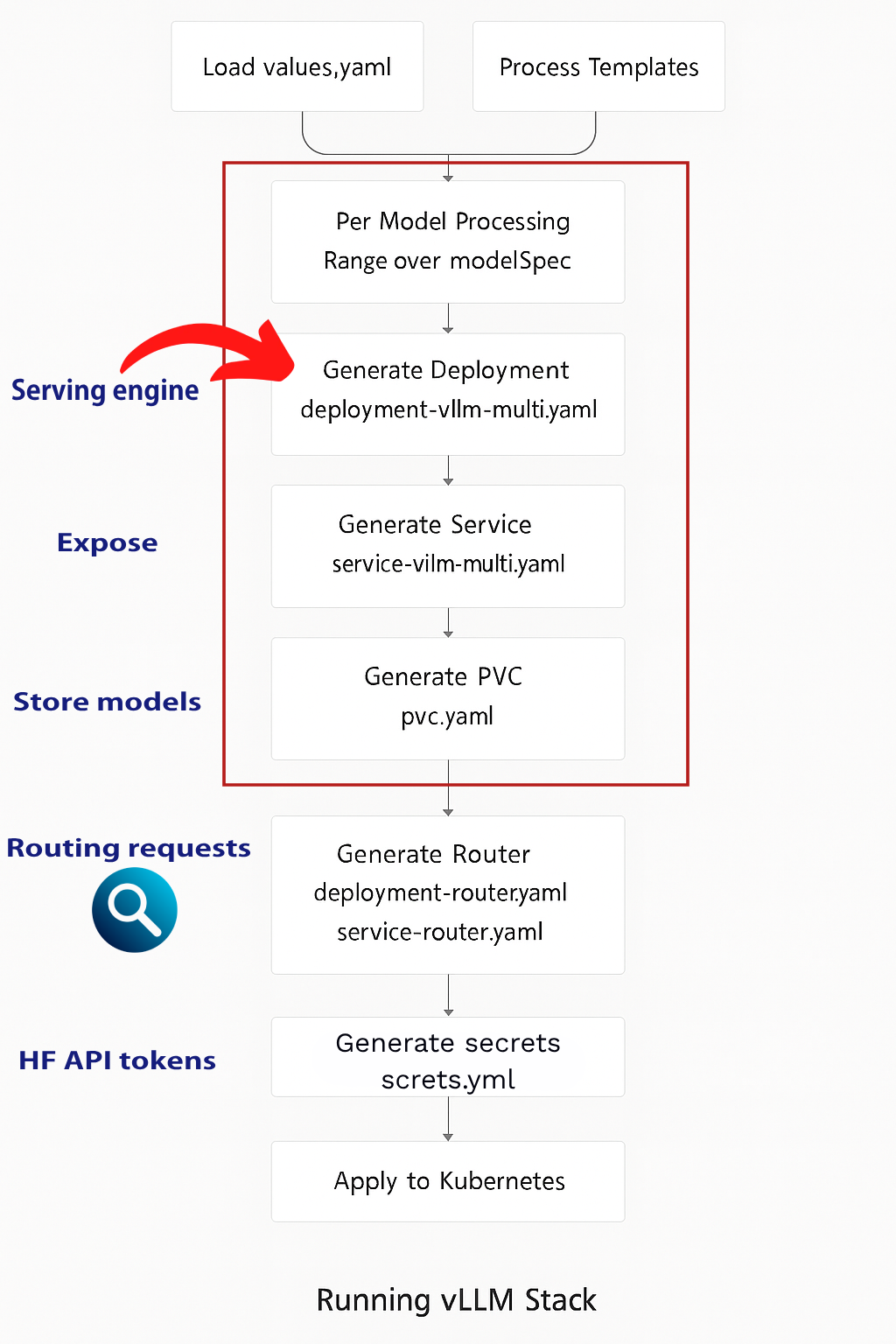
The resource generation follows a systematic process to transform configuration values into deployed K8s resources.
Core Configuration Structure
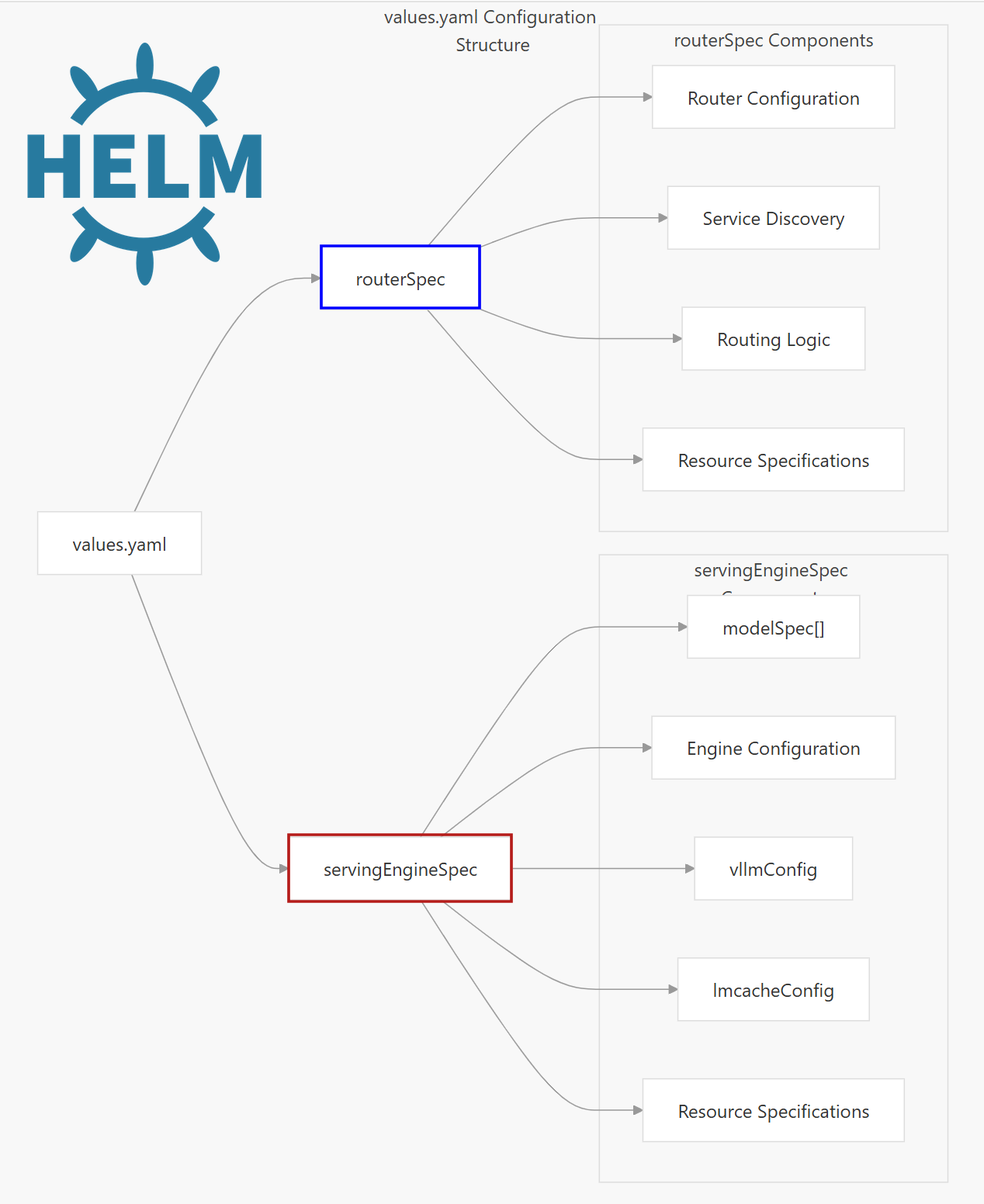
The Helm chart is organized around several specification blocks which which include the following Key components:
1️⃣. Serving Engine Spec – The core vLLM inference engine
2️⃣. Router Spec – Load balancer/router for distributing requests
3️⃣. Cache Server Spec – Caching layer for improved performance
4️⃣. Shared Storage – Persistent storage for models and data
5️⃣. LoRA Controller (Optional) — Out of scope
Template System Overview
The template files render the values into a full fleet, engine, router, cache-server, shared-storage PVCs, and more.
| Template File | Purpose | Key Resources Generated |
|---|---|---|
deployment-vllm-multi.yaml |
Creates serving engine deployments | Deployment, ConfigMap (chat templates) |
service-vllm-multi.yaml |
Exposes serving engines | Service resources for each model |
deployment-router.yaml |
Creates router deployment | Router Deployment |
service-router.yaml |
Exposes router service | Router Service, optional Ingress |
secrets.yaml |
Manages sensitive data | Secret for tokens and API keys |
pvc.yaml |
Creates storage claims | PersistentVolumeClaim for models |
1. Serving Engine
⦿ servingEngineSpec
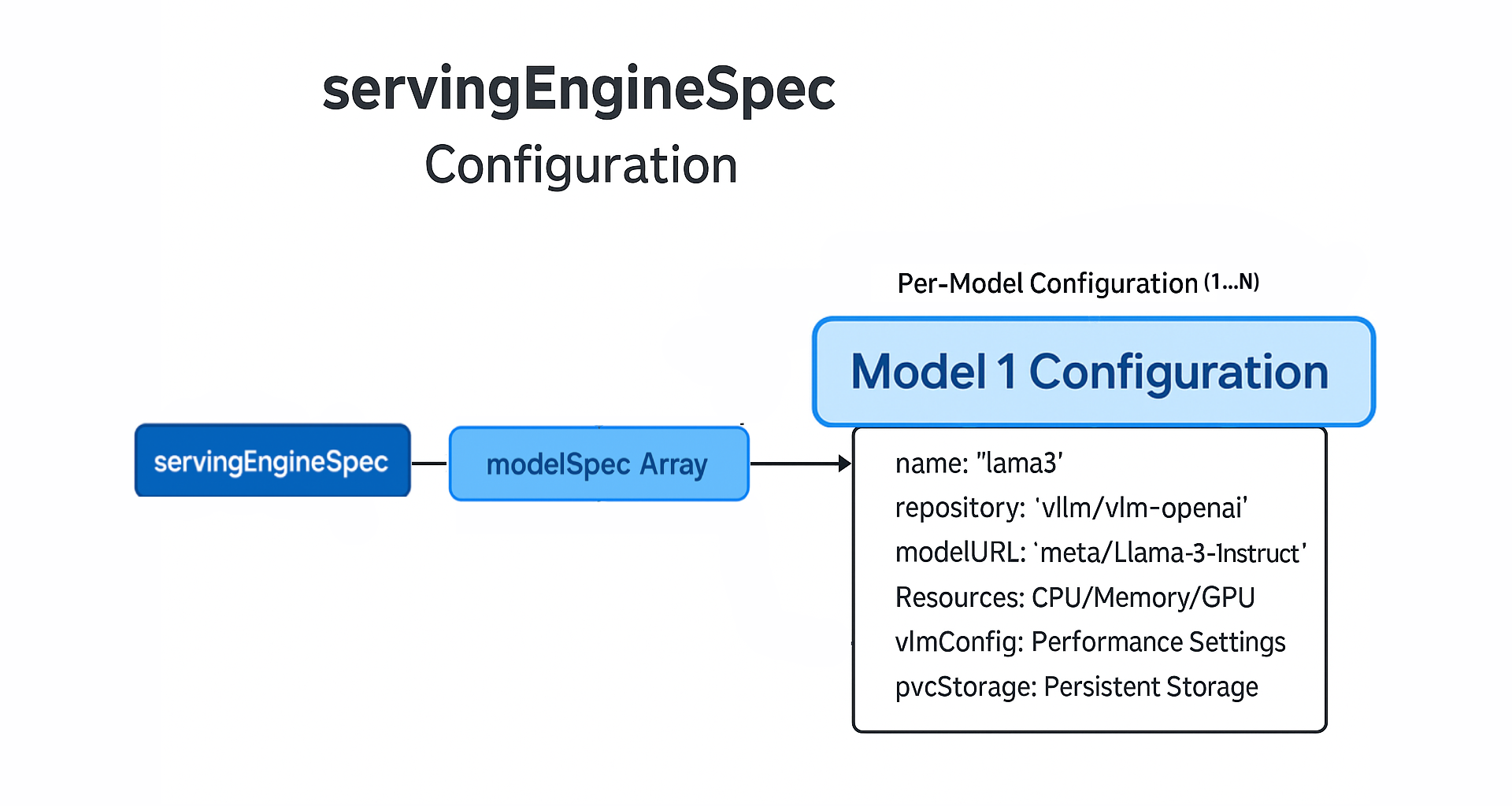
This section defines how your LLM models will be deployed and managed across your Kubernetes cluster.
Essential Fields:
| Field | Description | Example |
|---|---|---|
enableEngine |
Controls whether serving engines are deployed | true |
containerPort |
Default container port (8000) | 8000 |
servicePort |
Default service port (80) | 80 |
labels |
Custom labels for engine deployments | {key: value} |
configs |
Environment variables from ConfigMap | {key: value} |
securityContext |
Pod-level security context configuration | {} |
tolerations |
Node scheduling constraints for pods | [] |
📦Examples :
servingEngineSpec:
  strategy: # Strategy Configuration
    type: Recreate  # vs RollingUpdate
  enableEngine: true
  containerPort: 8000
  servicePort: 80
  labels:
    environment: "production"
    release: "v1.0"
  runtimeClassName: ""
servingEngineSpec:
# Health checks
livenessProbe:
initialDelaySeconds: 30
periodSeconds: 10
timeoutSeconds: 5
failureThreshold: 3
# For large models requiring extended startup time
startupProbe:
initialDelaySeconds: 60
periodSeconds: 30
failureThreshold: 120 # Allow up to 1 hour for startup
modelSpec:
# ... model configurationservingEngineSpec:
enableEngine: true
# Labels for service discovery
labels:
app: "vllm-engine"
version: "v1"
# Network configuration
containerPort: 8000
servicePort: 8000
# Security context
containerSecurityContext:
runAsNonRoot: false # default value
runAsUser: 1000
allowPrivilegeEscalation: false
securityContext:
fsGroup: 1000
runAsUser: 1000
# Scheduling
runtimeClassName: "nvidia"
schedulerName: "default-scheduler"
tolerations:
- key: "nvidia.com/gpu"
operator: "Equal"
value: "true"
effect: "NoSchedule"
# Pod disruption budget (corrected to string)
maxUnavailablePodDisruptionBudget: "1"
# Additional configurations
configs:
CUDA_VISIBLE_DEVICES: "0"
VLLM_WORKER_MULTIPROC_METHOD: "spawn"
# API security (corrected to use secret reference)
vllmApiKey:
secretName: "vllm-api-secret"
secretKey: "api-key"
# Model specifications (moved repository and tag here)
modelSpec:
- name: "your-model"
repository: "vllm/vllm-openai" # Moved from servingEngineSpec level
tag: "v0.4.2" # Moved from servingEngineSpec level
modelURL: "your-model-url"
replicaCount: 1
requestCPU: 4
requestMemory: "16Gi"
requestGPU: 1⦿ ModelSpec Array
Each modelSpec block entry represents a distinct model deployment with its own configuration including vLLM settings.
Essential Fields:
The Individual resource fields (i.e requestGPU) will be transformed into a resources specification by the Helm templates.
| Field | Description | Example |
|---|---|---|
name |
Unique identifier for the model deployment | “llama3” |
repository |
Container image repository | “vllm/vllm-openai” |
tag |
Container image tag | “latest” |
modelURL |
Hugging Face model identifier or local path | “meta-llama/Llama-3.1-8B-Instruct” |
replicaCount |
Number of pod replicas | 1 |
requestCPU |
CPU cores requested per replica | 10 |
requestMemory |
Memory requested per replica | “16Gi” |
requestGPU |
GPU units requested per replica | 1 |
📦Examples :
servingEngineSpec:
  strategy:
    type: Recreate
  modelSpec:
  - name: "chat-model"
    repository: "lmcache/vllm-openai"
    tag: "latest"
    modelURL: "meta-llama/Llama-3.1-8B-Instruct"
    replicaCount: 2
    requestCPU: 8
    requestMemory: "24Gi"
    requestGPU: 1
    pvcStorage: "50Gi"
    pvcAccessMode:
      - ReadWriteOnce
hf_token: <YOUR_HF_TOKEN> replicaCount:3 and requestGPU:1, you’re requesting 3 separate GPUs total (one per replica)
modelSpec:
  - name: "example"
    # ... other fields
    pvcStorage: "100Gi"
    pvcAccessMode: ["ReadWriteOnce"]
    storageClass: "fast-ssd"
    pvcMatchLabels:
      model: "llama"
servingEngineSpec:
modelSpec:
- name: "custom-fine-tuned-model"
repository: "vllm/vllm-openai" # Required field
tag: "latest" # Required field
modelURL: "/shared-storage/models/custom-model"
replicaCount: 1
requestCPU: 8
requestMemory: "32Gi"
requestGPU: 2
vllmConfig:
maxModelLen: 4096
tensorParallelSize: 2
extraArgs:
- "--gpu-memory-utilization=0.9"
- "--max-num-batched-tokens=8192"
- "--max-num-seqs=256"
- "--enable-prefix-caching"
- "--disable-log-stats"
- "--trust-remote-code" # hugging face source
- name: "multi-modal-model"
repository: "vllm/vllm-openai"
tag: "latest"
modelURL: "/shared-storage/models/llava-v1.5-7b"
replicaCount: 1
requestCPU: 4
requestMemory: "16Gi"
requestGPU: 1
vllmConfig:
maxModelLen: 4096
tensorParallelSize: 1
extraArgs:
- "--limit-mm-per-prompt=image=4"
- "--trust-remote-code"
- name: "embedding-model"
repository: "lmcache/vllm-openai"
tag: "latest"
modelURL: "BAAI/bge-large-en-v1.5"
replicaCount: 1
requestCPU: 4
requestMemory: "16Gi"
requestGPU: 1
env:
- name: HUGGING_FACE_HUB_TOKEN
valueFrom:
secretKeyRef:
name: huggingface-credentials
key: HUGGING_FACE_HUB_TOKEN
- name: VLLM_ALLOW_RUNTIME_LORA_UPDATING
value: "True"modelSpec array supports Enterprise deployments that require serving multiple models simultaneously.
⦿ vLLMConfig
vllmConfig is a child block of modelSpec with vLLM-specific configurations like context size and data type (i.e FP16).
Essential Fields:
| Field | Description | Example |
|---|---|---|
maxModelLen |
Maximum sequence length | 4096 |
dtype |
Model data type precision | “bfloat16” |
enableChunkedPrefill |
Enable chunked prefill optimization | false |
enablePrefixCaching |
Enable KV cache prefix caching | false |
gpuMemoryUtilization |
GPU memory utilization ratio | 0.9 |
tensorParallelSize |
Tensor parallelism degree | 1 |
extraArgs |
Additional vLLM engine arguments | [] |
📦Examples :
servingEngineSpec:
  runtimeClassName: ""
  modelSpec:
  - name: "llama3"
    repository: "vllm/vllm-openai"
    modelURL: "meta-llama/Llama-3.1-8B-Instruct"
    replicaCount: 2
    requestGPU: 1
  # ... Rest of the modelSpec params
  vllmConfig:
    enablePrefixCaching: true
    enableChunkedPrefill: false
    maxModelLen: 1024
    dtype: "bfloat16"
    tensorParallelSize: 2
    maxNumSeqs: 32
    gpuMemoryUtilization: 0.80
    extraArgs: ["--disable-log-requests", "--trust-remote-code"]
  hf_token: <YOUR_HF_TOKEN>
shmSize: "6Gi" # only if tensorParallelism is enabledgpuMemoryUtilization applies per replica, not across all replicas at once: (3 replicas => 0.80 x 3GPU).
⦿ LMCacheConfig
lmcacheConfig is a modelSpec sub block enabling KV cache offloading to CPU memory.
Essential Fields:
| Field | Description | Example |
|---|---|---|
enabled |
Whether to enable LMCache for KV offloading | true |
cpuOffloadingBufferSize |
The CPU offloading buffer size for LMCache | “30” |
diskOffloadingBufferSize |
The disk offloading buffer size for LMCache | “” |
📦Examples :
servingEngineSpec:
  modelSpec:
  - name: "llama3"
    # ... other fields
    lmcacheConfig:
      enabled: true
      cpuOffloadingBufferSize: "20"
    env:
      - name: LMCACHE_LOG_LEVEL
        value: "DEBUG"
lmcacheConfig:
enabled: true
cpuOffloadingBufferSize: "60"
enableController: true
instanceId: "default1"
controllerPort: "9000"
workerPort: 8001lmcacheConfig:
cudaVisibleDevices: "0"
enabled: true
kvRole: "kv_producer"
enableNixl: true
nixlRole: "sender"
nixlPeerHost: "vllm-llama-decode-engine-service"
nixlPeerPort: "55555"
nixlBufferSize: "1073741824" # 1GB
nixlBufferDevice: "cuda"
nixlEnableGc: true
enablePD: true
cpuOffloadingBufferSize: 0⦿ Security and Authentication
For secure deployments, the stack supports API key and hugging face token authentication.
Essential Fields:
| Field | Description | Example |
|---|---|---|
vllmApiKey |
API Key Auth: to model endpoints | “vllm_xxxxx” or secret reference |
hf_token |
HuggingFace authentication token | “hf_xxxxx” or secret reference |
serviceAccountName |
RBAC Integration: through k8s service accounts | “vllm-service-account” |
networkPolicies |
K8s-native network security | Network policy configuration |
📦Examples :
The vllmApiKey field supports two formats for API key specification:
# Direct string (stored in generated secret)
servingEngineSpec:
  vllmApiKey: "vllm_secret_key_here"

# Reference to existing secret
servingEngineSpec:
  vllmApiKey:
    secretName: "my-secret"
    secretKey: "api-key"
Similar dual-format support for Hugging Face authentication:
# Per-model token configuration
modelSpec:
  - name: "gated-model"
    hf_token: "hf_token_here"
    # or
    hf_token:
      secretName: "hf-secrets"
      secretKey: "token"
env:
- name: HUGGING_FACE_HUB_TOKEN
valueFrom:
secretKeyRef:
name: huggingface-credentials
key: HUGGING_FACE_HUB_TOKEN
- name: VLLM_ALLOW_RUNTIME_LORA_UPDATING
value: "True"2. Router
The routerSpec section configures the vLLM router, handling request routing and load balancing across serving engines.
Essential Fields:
| Field | Description | Example |
|---|---|---|
enableRouter |
Enable router deployment | true |
serviceDiscovery |
Service discovery mode for the router (“k8s” or “static”) | “k8s” |
repository |
Router container image repository | “lmcache/lmstack-router” |
tag |
Container image tag | “latest” |
replicaCount |
Number of router replicas | 1 |
routingLogic |
Routing algorithm | “roundrobin” |
sessionKey |
Session header key (for session routing) | “x-user-id” |
resources |
Resource requests and limits | {} |
vllmApiKey |
Fallback API key for securing the vLLM models | secret reference |
📦Examples :
routerSpec:
  engineScrapeInterval: 15
  requestStatsWindow: 60
  enableRouter: true
  repository: "lmcache/lmstack-router"
  tag: "latest"
  replicaCount: 1
  routingLogic: "rundrobin"  # default
  serviceDiscovery: "k8s"
  # Auto-discovers services in same namespace using servingEngineSpec.labels selector
  # serviceDiscovery: "static"
  # staticBackends: "http://model1:8000,http://model2:8000"
  # staticModels: "llama-7b,mistral-7b"
  containerPort: 8000
  servicePort: 80
  # OPTIONAL
  vllmApiKey:
    secretName: "my-secret"
secretKey: "api-key"routerSpec.vllmApiKey is a fallback API key configuration that’s only used when the serving engine is disabled.
routerSpec:
  repository: "lmcache/lmstack-router"
  tag: "kvaware-latest"
  routingLogic: "session"
  sessionKey: "X-Session-ID"
  extraArgs:
    - "--log-level"
    - "info"
  resources: {}
servingEngineSpec:
modelSpec:
- name: "llama-prefill"
# ... model configuration
lmcacheConfig:
enabled: true
kvRole: "kv_producer"
enablePD: true
- name: "llama-decode"
# ... model configuration
lmcacheConfig:
enabled: true
kvRole: "kv_consumer"
enablePD: true
routerSpec:
routingLogic: "disaggregated_prefill"
extraArgs:
- "--prefill-model-labels"
- "llama-prefill"
- "--decode-model-labels"
- "llama-decode" 3. Cache Server
cacheServerSpec is used for configuring remote shared KV cache storage using LMCache.
Essential Fields:
| Field | Description | Example |
|---|---|---|
replicaCount |
Number of cache server replicas | 1 |
containerPort |
Container port for the cache server | 8080 |
servicePort |
Service port for external access | 81 |
serde |
Serializer/Deserializer type | “naive” |
repository |
Container image repository | “lmcache/vllm-openai” |
tag |
Container image tag | “latest” |
resources |
Resource requests and limits | CPU/Memory specifications |
labels |
Custom labels for cache server deployment | {“environment”: “cacheserver”} |
nodeSelectorTerms |
Node selection criteria for scheduling | Node selector configuration |
📦Examples :
cacheserverSpec:
  replicaCount: 1
  containerPort: 8080
  servicePort: 81
  serde: "naive"    # serialization/deserialization

  repository: "lmcache/vllm-openai"
  tag: "latest"
  resources: {}
  labels:
    environment: "cacheserver"
    release: "cacheserver"
4. Shared Storage
This Bock configures shared storage across multiple models for efficient model weight management.
Essential Fields:
| Field | Description | Example |
|---|---|---|
enabled |
Enable shared storage creation | true |
size |
Storage capacity for the PersistentVolume | “100Gi” |
storageClass |
Kubernetes storage class name | “standard” |
accessModes |
Volume access modes for multi-pod access | [“ReadWriteMany”] |
hostPath |
Local host path for single-node development | “/data/shared” |
nfs.server |
NFS server hostname for production clusters | “nfs-server.example.com” |
nfs.path |
NFS export path on the server | “/exports/vllm-shared” |
📦Examples :
sharedStorage:
  enabled: true
  size: "100Gi"
  storageClass: "standard"
  nfs:
    server: "nfs-server.example.com"
    path: "/exports/vllm-shared"
  accessModes:
    - ReadWriteMany
sharedStorage:
enabled: true
size: "100Gi"
storageClass: "standard"
hostPath: "/data/shared"
accessModes:
- ReadWriteManysharedStorage.enabled is set to true.
II. Deployment Recipes
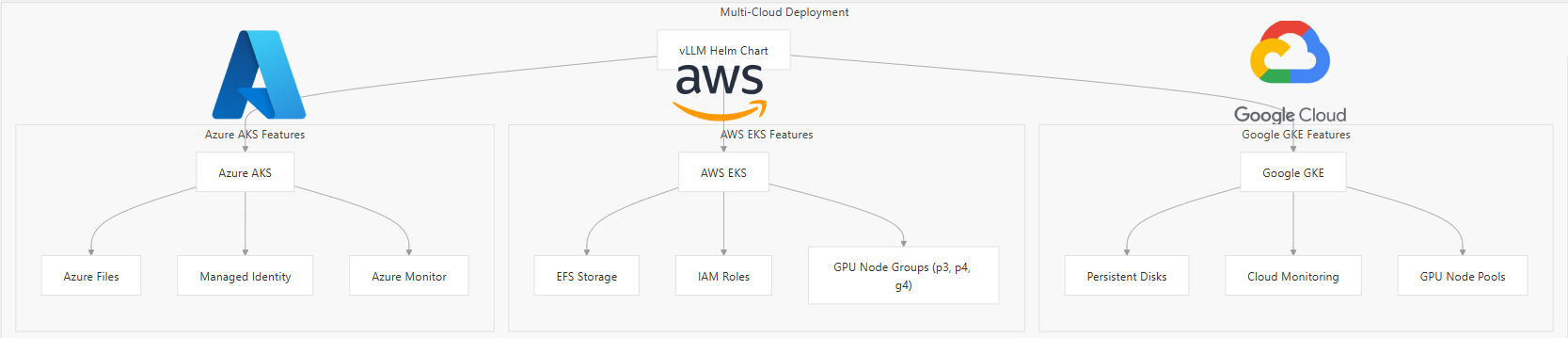
Production-stack tutorials folder contains 20+ deployment scenarios. Anything from spinning up Minikube environment to multi-GPU parallelism. Below are deployment recipes, ranging from a minimal setup to cloud based roll-outs.
Note: We assume the chart repository has already been added using the following command:
helm repo add vllm https://vllm-project.github.io/production-stack
helm repo update1️⃣. Minimal Local Deployment(CPU)
For most beginners, dev environments means 0 GPUs, and that’s fine. You can easily start with a minimal, CPU-only vLLM stack right on your laptop’s k8s using the official pre-built vllm CPU image from AWS ECR.
# cpu-tinyllama-values.yaml
servingEngineSpec:
  enableEngine: true
  runtimeClassName: ""  # Override the default "nvidia" runtime
  containerSecurityContext:
    privileged: true
  modelSpec:
  - name: "tinyllama-cpu"
    repository: "public.ecr.aws/q9t5s3a7/vllm-cpu-release-repo"
    tag: "v0.8.5.post1"
    modelURL: "TinyLlama/TinyLlama-1.1B-Chat-v1.0"
    replicaCount: 1
    requestCPU: 3
    requestMemory: "3Gi"
    requestGPU: 0  # CPU Only
    limitCPU: "4"
    limitMemory: "6Gi"
    pvcStorage: "10Gi"
 #  device: "cpu"   Undocumented
    vllmConfig:
      dtype: "bfloat16"
      extraArgs:
        - "--device"
        - "cpu"
    env:
      - name: VLLM_CPU_KVCACHE_SPACE
        value: "1"
      - name: VLLM_CPU_OMP_THREADS_BIND
        value: "0-2"
      - name: HUGGING_FACE_HUB_TOKEN  # Optional for TinyLlama
        valueFrom:
          secretKeyRef:
            name: hf-token-secret
            key: token
routerSpec:
  enableRouter: true
  routingLogic: "roundrobin"
helm install vllm-cpu vllm/vllm-stack -f cpu-tinyllama-values.yaml2️⃣. AWS EKS Deployment
For AWS deployments, the deployment process leverages AWS-specific features like EFS for shared storage and IAM roles for service authentication. Key considerations for AWS deployments are:
- GPU Node Groups: Configure EKS with GPU-enabled instances (g4(T4), p3(T100), p4(A100) families)
- Storage Integration: Use EFS or EBS for persistent model storage
- Network Configuration: Proper VPC and security group setup for multi-AZ deployments
# eks-values.yaml
servingEngineSpec:
  runtimeClassName: nvidia
  modelSpec:
  - name: llama3
    modelURL: meta-llama/Meta-Llama-3-8B-Instruct
    requestGPU: 1
    requestGPUType: "nvidia.com/gpu"
    replicaCount: 3
    pvcStorage: 100Gi

routerSpec:
  serviceType: LoadBalancer        # creates an AWS NLB

sharedStorage:
  enabled: true
  size: 200Gi
  storageClass: efs-sc             # EFS CSI driver
helm install vllm-eks vllm/vllm-stack -f eks-values.yamlgit clone https://github.com/vllm-project/production-stack.git
cd deployment_on_cloud/aws
bash entry_point.sh YOUR_AWS_REGION production_stack_specification.yaml # YAML_PATH⚡AWS Tutorial link (requires AWS)
- This script:
- Creates an EKS cluster with GPU nodes
- Sets up EFS for shared storage
- Configures the EFS CSI driver
- Deploys the vLLM stack via Helm
3️⃣. Google Cloud GKE Deployment
GKE deployments benefit from Google Cloud’s managed Kubernetes service and integrated GPU support.
The GKE deployment includes:
- Filestore integration: Mounts a shared Filestore volume so every engine replica can load the same weights.
- Router exposure: Use external GCP load balancer for public access (or turn on Ingress if you prefer).
# gke-values.yaml
servingEngineSpec:
  runtimeClassName: nvidia          # GKE GPU runtime class
  modelSpec:
    - name: mistral
      modelURL: mistralai/Mistral-7B-Instruct-v0.2
      replicaCount: 3
      requestGPU: 1
      requestGPUType: "nvidia.com/gpu"
      pvcStorage: 100Gi

routerSpec:
  serviceType: LoadBalancer         # Creates a regional external LB
  ingress:
    enabled: false                  # Optional: keep off if using LB
# ---
sharedStorage:
  enabled: true
  size: 200Gi
  # Filestore CSI storage class created by:
  # gcloud filestore instances create ...
  storageClass: filestore-csi      # Or your own Filestore CSI class
helm install vllm-gke vllm/vllm-stack -f gke-values.yamlgit clone https://github.com/vllm-project/production-stack.git
cd deployment_on_cloud/gcp
bash entry_point.sh YOUR_AWS_REGION production_stack_specification_basic.yaml
⚡GCP Tutorial link (requires gcloud)
- This script:
- Creates an GKE cluster with GPU nodes (n2d-standard-8) and Managed Prometheus
- Configures Horizontal Pod and HTTP Load Balancing addons
- Automatically handles GKE persistent disk provisioning
4️⃣. Azure AKS Deployment
Azure deployments leverage AKS with specific configurations for enterprise workloads.
Azure-specific features include:
- Azure Files Integration: Shared storage across multiple pods
- Managed Identity: Secure access to Azure resources
- Azure Monitor: Comprehensive observability integration
# aks-values.yaml
servingEngineSpec:
  runtimeClassName: nvidia
  modelSpec:
  - name: phi3
    modelURL: microsoft/phi-3-mini-4k-instruct
    requestGPU: 1
    replicaCount: 2

routerSpec:
  ingress:
    enabled: true
    className: nginx

sharedStorage:
  enabled: true
  storageClass: azurefile
  size: 200Gi
helm install vllm-aks vllm/vllm-stack -f aks-values.yaml
git clone https://github.com/vllm-project/production-stack.git
cd deployment_on_cloud/azure
bash entry_point.sh setup EXAMPLE_YAML_PATH⚡Azure Tutorial link (requires Azure cli)
- This script:
- Creates an AKS cluster with GPU nodes
- Configures Azure Files
- Integrates with Azure Monitor
- Deploys the vLLM inference stack
🛡️Deployment Best Practices
🧮Resource Planning
- GPU Sizing: Match GPU memory to model requirements
- CPU Allocation: Ensure sufficient CPU for preprocessing
- Memory Planning: Account for model weights and KV cache
🪢High Availability
- Multi-Zone Deployment: Distribute across availability zones
- Health Checks: Configure appropriate startup and readiness probes
- Backup Strategies: Implement model weight backup procedures
⚡Performance Optimization
- Request Routing: Configure session stickiness for cache efficiency
- Batch Processing: Optimize batch sizes for throughput
- Model Quantization: Use appropriate data types (bfloat16, int8)
🚀Conclusion
We’ve just seen how to leverage helm chart to deploy vLLM Production-Stack in both local and cloud-based K8s clusters. By now, we’ve covered the architecture along with varied deployment options. The vLLM Production-Stack makes it easy to:
- Choose the right vLLM configuration for your use case
- Understand and implement performance tuning options
- Enable advanced features like caching and quantization
- Configure distributed inference properly
With this material in hand, you’re now ready to efficiently scale LLMs using vLLM production stack in Kubernetes!
Reference
🙋🏻♀️If you like this content please subscribe to our blog newsletter ❤️.
👋🏻Want to chat about your challenges?
We’d love to hear from you!

Run AI Your Way — In Your Cloud
Want full control over your AI backend? The CloudThrill VLLM Private Inference POC is still open — but not forever.
📢 Secure your spot (only a few left), 𝗔𝗽𝗽𝗹𝘆 𝗻𝗼𝘄!
Run AI assistants, RAG, or internal models on an AI backend 𝗽𝗿𝗶𝘃𝗮𝘁𝗲𝗹𝘆 𝗶𝗻 𝘆𝗼𝘂𝗿 𝗰𝗹𝗼𝘂𝗱 –
✅ No external APIs
✅ No vendor lock-in
✅ Total data control