Do You Speak AHF ?
Oracle Autonomous Health Framework (AHF) presents the next generation of All in one solution that includes tools which work together autonomously 24×7 to keep database systems healthy and running. It does so while minimizing human reaction time using existing components like orachk, TFA and many more.
I started digging about this tool ever since I attended Bill Burton‘s (lead dev for TFA Collector feature at Oracle) presentation at RMOUG2020. As most of you, I had been asked numerous times to collect diagnostics and myriads of logs (IPS,RDA..etc) from MOS when I opened SRs. It just didn’t get better with years, so when I heard about that new thing that can merge Health and Diagnostics in one tool, I wanted to give it a try. I Hope you’ll find this AHF Cheat Sheet (blabla free) useful .
Advantages:
- User friendly & real-time health monitoring, fault detection & diagnosis via a single interface
- Secure consolidation of distributed diagnostic collections
- Continuous availability
- Machine learning driven, autonomous degradation detection, reduces your overheads (on both customer and oracle support Tiers)
- TFA is still used for diagnostic collection and management and ORAchk/EXAchk for compliance check.
- ORAchk/EXAchk now use the TFA secure socket and TFA scheduler for automatic checks (less overhead).
Direct links :
– AHF Config checks
– Orachk
– TFA
– What’s New in AHF 20.2
Installation Instructions
- As ROOT (recommended) : download the file,unzip and run the setup file (see AHF – (Doc ID 2550798.1)
Requirement: AHF DATA directory : /5GB-10GB
$ unzip  AHF-LINUX_v20.1.1.BETA.zip -d AHF
$ ./AHF/ahf_setup
common locations of ahf_loc is /opt/oracle/dcs/oracle.ahf or /u01/app/grid/oracle.ahf- Windows
Download & unzip the Windows installer then run the following command (adapt the perlhome) :
C:> installahf.bat -perlhome D:\oracle\product\12.2.0\dbhome_1\perl- Syntax
$ ahf_setup [-ahf_loc AHF Location]
            [-data_dir AHF Repository]  -- Stores collections, metadata,etc (mandatory on
                                           Silent install). Location is either under ahf_loc
                                          (5G)or TFA repo if outside Grid_Home,or above Grid
                                           Base, or different.
          [-nodes node1,node2]        -- default all
          [-extract[-notfasetup]]     -- ahf_setup -extract [exachk|orachk] install
                                         ORAchk/EXAchk without installing the rest of AHF.
                                         -notfasetup option just extract TFA no install
          [-local]
          [-silent]
          [-tmp_loc directory]       -- Default: /tmp
[-debug [-level 1-6]] -- 1= FATAL, 2= ERROR, 3= WARNING, 4=INFO, 5=DEBUG,6= TRACE- Install with non default install or data location
[root$] ./ahf_setup [-ahf_loc install_dir] [-data_dir data_dir]- Install orachk/exachk without TFA
[root$] ahf_setup -extract orachk/exachk
#OR ahf_setup -extract-notfasetup.- You can check the status of AHF after upgrade\installation using the below command
[root@nodedb1 ~]# tfactl status
.---------------------------------------------------------------------------------------------.
| Host   | Status of TFA | PID   | Port | Version   | Build ID             | Inventory Status |
+--------+---------------+-------+------+-----------+----------------------+------------------+
| Nodedb1| RUNNING       | 96324 | 5000 | 20.1.1.0.0| 20110020200220143104 | COMPLETE         |
| Nodedb0| RUNNING | 66513 | 5000 | 20.1.1.0.0| 20110020200220143104 | COMPLETE |- For advanced installation options, see User Guide .
- You can manually uninstall AHF in case it got corruption :
# rpm -e oracle-ahf
# tfactl uninstallCONFIGURATION CHECKS
In this section we will first learn how to query current setting of AHF.
If you wish to synchronize your RAC nodes when a new node is added run the below :
# tfactl syncnodes- Tfactl print Commands
# tfactl  print
options [status|components|config|directories|hosts|actions|repository|suspendedips|protocols|smtp]> example: Quick list scan listener logs directories when troubleshooting listener issues
# tfactl print directories -node node1 -comp tns -policy noexclusions- List AHF parameters
#  tfactl print config
-- you can also set or display a single parameter as shown below
# tfactl print version
# tfactl print hosts
     Host Name : racnode1
     Host Name : racnode2
# tfactl get autodiagcollect
# tfactl set autodiagcollect=ON- List repositories
[root@nodedb1]# tfactl print repository    -- Shows the AHF data repositories .
[root@nodedb1]# tfactl showrepo -all       -- Same but with options(-TFA or -Compliance)
  .-----------------------------------------------------------------.
  |                             Myhost                              |
  +----------------------+------------------------------------------+
  | Repository Parameter | Value                                    | ====> -TFA
  +----------------------+------------------------------------------+
  | Location             | /u01/app/grid/oracle.ahf/data/repository |
  | Maximum Size (MB)    | 10240                                    |
  | Current Size (MB)    | 3                                        |
  | Free Size (MB)       | 10237                                    |
  | Status               | OPEN                                     |
  '----------------------+------------------------------------------'
 orachk repository: /u01/app/grid/oracle.ahf/data/nodedb1/orachk   ====> -complaince(Orachk)
 - can also be checked here:
[root@nodedb1]# cat /opt/oracle/dcs/oracle.ahf/tfa/tfa.install.propertiesNote : If the maximum size is exceeded or the file system free space gets to <=1 GB , then AHF suspends operations and closes the repository.
Use the tfactl purge command to clear collections from the repository.
[root@server] tfactl purge -older n[h|d] [-force]
[root@server] tfactl purge -older 30d
[root@server] tfactl purge -older 10h
-- Change retention
[root@server] tfactl set minagetopurge=48 -- default is 2 weeks- Directories
You can see it during the installation or from the config file
[root@nodedb1]# cat /opt/oracle/dcs/oracle.ahf/tfa/tfa.install.properties
.-----------------------------------------------------------------------------------------------.
|                       Summary of AHF Configuration                                            |
+-----------------+----------------------------------------------------+------------------------+
| Parameter       | Value                                              |       Content          |
+-----------------+----------------------------------------------------+------------------------'
| AHF Location    | /opt/oracle/dcs/oracle.ahf                         | installation diretory  |
| TFA Location    | /opt/oracle/dcs/oracle.ahf/tfa                     |                        |
| Orachk Location | /opt/oracle/dcs/oracle.ahf/orachk                  |                        |
| Data Directory  | /opt/oracle/tfa/tfa_home/oracle.ahf/data           |Logs from all components|
| Repository      | /opt/oracle/tfa/tfa_home/oracle.ahf/data/repository|Diagnostic collections  |
| Diag Directory  | /opt/oracle/tfa/tfa_home/oracle.ahf/data/host/diag |Logs from all components|
| Analyzer Dir    | /opt/oracle/dcs/oracle.ahf/tfa/analyzer            |                        |
'-----------------+----------------------------------------------------'------------------------'Tools
To view the status of Oracle TFA Support Tools (across nodes if RAC) hit the below command.
[oracle@server]  tfactl toolstatus
.-------------------------------------------------------------------------------------------------------------------------------------------------------+.
|                  TOOLS STATUS - HOST : - My Host                                                                                                      |
+---------------------+--------------+------------------------------------------------------------------------------------------------------------------|
| Tool Type           | Tool         | Description                                                                                                      |
+---------------------+--------------+------------------------------------------------------------------------------------------------------------------|
| Development Tools   | orachk       | Oracle AHF installs either Oracle EXAchk for engineered systems or Oracle ORAchk for all non-engineered systems. |
|                     | oratop       | Provides near real-time database monitoring                                                                      |
+---------------------+--------------+------------------------------------------------------------------------------------------------------------------|
|Support Tools Bundle | darda        | Diagnostic Assistant:Provides access to  RDA, ADR, OCM                                                           |
|                     oswatcher(oswbb| Collects/archives OS metrics. metrics are useful for instance/node evictions and performance Issues.             |
|                     | prw          | procwatcher (prw) Automates and captures database performance diagnostics and session level hang information     |
+-------------------- +--------------+--------------+---------------------------------------------------------------------------------------------------|
| TFA Utilities       | alertsummary |Provides summary of events for one (-database x) or more or Oracle ASM alert files from all nodes.                |
|                     | calog        |Prints Oracle Clusterware activity logs.                                                                          |
|                     | dbcheck      |                                                                                                                  |
|                     | dbglevel     |Sets Oracle Clusterware log / trace levels using profiles.                                                        |
|                     | grep         |grep for input string in logs                                                                                     |
|                     | history      | Lists commands run in current Oracle Trace File Analyzer shell session.                                          |
|                     | ls           | Searches files in Oracle Trace File Analyzer                                                                     |
|                     | managelogs   | Purge slogs                                                                                                      |
|                     | menu         | Oracle Trace File Analyzer Collector menu system.                                                                |
|                     | param        | Prints parameter value.                                                                                          |
|                     | ps           | Finds a process.                                                                                                 |
|                     | pstack       | Runs pstack on a process                                                                                         |
|                     | summary      | Prints system summary.                                                                                           |
|                     | tail         | Tails log files.                                                                                                 |
|                     | triage       | Summarize OSWatcher / ExaWatcher data. /tfactl.pl [run] triage -t <datetime> -d <duration> [-a] [-p <pid>] [-h]  |
|                     | vi           | Searches and opens files in the vi editor.                                                                       |
'---------------------+--------------+-----------------------------------------------------------------------------------------------------------------+AHF(TFA) Main Menu
The Oracle TFA Menu provides an Interface to the TFA tools.
 # tfactl menu
 1. System Analysis
       Select one of the following categories:
         1. Summary
         2. Events
         3. Analyze logs
         4. TFA Utilities
         5. Support Tool Bundle
         6. Tools status
  2. Collections
      Select one of the following options:
        1. Default Collection
        2. SRDC Collection
        3. Engineered System Collection
        4. Advanced Collection
  3.Administration
    Select One of the following options:
      1. Version & status
      2. Start, stop & auto start
      3. Hosts & ports
      4. Settings
      5. Actions submitted
      6. Manage Database logs
      7. Tracing Level
      8. Users
9. Collect TFA Diagnostic DataComponents
ORAchk
Autostart for either ORAchk/Exachk will perform compliance tasks as described bellow:
- 1 am daily : Orachk/Exachk daemon restarts everyday to discover any environment changes .
- 2 am daily : Partial orachk run > The track most severe problems once a day ( oratier1/exatier1)
- 3 am Sunday: Full Exa/Orachk > All known problems once a week .
- Send an email to the notification address for each run with the health scores, check failures and changes since last run.
- The daemon also automatically purges the repository every 2 weeks.
Check Orachk Daemon
--- Displays information about the running daemon.

$ orachk -d info
--- Checks if the daemon is running. OR ()$ tfactl compliance -d status )
$ orachk -d status

--- check orachk daemon status
$ tfactl statusahf -compliance
  orachk scheduler is running [PID: 99003] [Version: 20.1.0(BETA)]

---  Start/Stop the daemon

$ orachk -d start/stop
$ tfactl stopahf/startahf -compliance

--- Displays the next automatic run time.
$ orachk -d nextautorun

$ orachk –d ID autostart_client nextautorun

-- specific profile id:(autostart_client/os/etc)Getting Options for the Daemon
SET/GET Options :
 - AUTORUN_SCHEDULE, NOTIFICATION_EMAIL,COLLECTION_RETENTION,

AUTORUN_FLAGS,PASSWORD_CHECK_INTERVAL- Orachk Profiles :
Each compliance Task has a dedicated profile
1- autostart_discovery : First time a demon started
2- daemon_autostart : daily restart at 1am
3- autostart_client_oratier1 : partial run 2am
4- autostart_client : Full run on Sunday 3am
[root@nodedb1 ~]# orachk -get  NOTIFICATION_EMAIL,AUTORUN_SCHEDULE,COLLECTION_RETENTION
------------------------------------------------------------
ID: orachk.autostart_discovery
------------------------------------------------------------
ID: orachk.daemon_autostart
------------------------------------------------------------
NOTIFICATION_EMAIL  =
AUTORUN_SCHEDULE  =  0 1 * * *
------------------------------------------------------------
ID: orachk.autostart_client_oratier1
------------------------------------------------------------
NOTIFICATION_EMAIL  =  user1@example.com
AUTORUN_SCHEDULE  =  0 2 * * *
COLLECTION_RETENTION  =  7
------------------------------------------------------------
ID: orachk.autostart_client
------------------------------------------------------------
NOTIFICATION_EMAIL  =  user1@example.com
AUTORUN_SCHEDULE  =  0 3 * * 0
COLLECTION_RETENTION  =  14
------------------------------------------------------------You can also query the parameter per profile:
$ orachk –id autostart_client -get all --- Query daemon options for weekly profileSetting Orachk Options
- Set autostart option (enabled by default after installation)
$ orachk –autostart
orachk daemon is started with PID : 99003
 Daemon log file location

    is : /opt/oracle/tfa/tfa_home/oracle.ahf/data/nodedb1/orachk/orachk_daemon.log
OR

$ tfactl startahf -compliance- Notification for Orachk/Exachk
=====================================
For both daily and weekly job profile
======================================
$ orachk -id autostart_client_oratier1 -set  NOTIFICATION_EMAIL=user1@example.com
$ orachk -id autostart_client -set NOTIFICATION_EMAIL=user1@example.com- Schedule and Retention
$ orachk -id autostart_client_oratier1 –set "AUTORUN_SCHEDULE=0 3 * * *"  -> Time= 3 AM daily
$ orachk -id autostart_client –set "collection_retention=7"- TEST the Notification
--- Sends a test email to validate email configuration.
$ orachk -testemail notification_email=user1@example.com
--- Send an orachek report by email to a test address
$ orachk –sendemail "notification_email=user1@example.com"- Run Orachk
$ orachk -h
  -nopass           --- Does not show passed checks.
  -show_critical    --- Show Critical checks in the orachk report by default
  -localonly        --- only on the local node.
  -dbnames db_names --- Specify a list of DB names to run only on a subset of DBs.
  -dbnone           --- skips dbs
  -dball            --- all Dbs
  -b                --- Runs only the best practice checks.no recommended patch checks.
  -p                --- Runs only the patch checks.
  -m                --- Excludes Maximum Availability Architecture (MAA) checks.
  -diff             --- compare two orachk reports
  -clusternodes  dbadm01,dbadm02,dbadm03,dbadm04
  -nordbms          --- Runs in Grid environments with no Oracle Database.
  -cvuonly          --- Runs only Cluster Verification Utility (oposite= -nocvu)
  -failedchecks  <previous_run.html> ---Runs only checks from the presious_result,that failed

        -profile profile/-excludeprofile peoplesoft,seibel,storage,dba,asm,control_VM,
                                   preinstall,prepatch,hardware,goldengate,oratier1,
                                   virtual_infra,obiee,ebs,control_VM,..
  -showrepair  <check_id>     --- Show repair command for given check id..
  -repair all| <check_id>,[<check_id>,..] | <file> -- Repair check(s).
  -nordbms          --- Runs in Grid environments with no Oracle Database.
  -cvuonly          --- Runs only Cluster Verification Utility
  -showrepair <check_id> --- Show repair command for given check id.
  -pre/postupgrade      --- run pre/post-upgrade best practice checks for 11.2.0.4 databases

                            and above

Exadata :   -ibswitches switches
-cells cellsTFA
- Trace File Analyzer will monitor for significant issues and If any is detected it will automatically:
- Take a diagnostic collection of everything needed to diagnose & resolve (cluster wide where necessary)
- Collocate distributed collections and Analyze collections for known problems
- Send an email notification, containing details of the issues detected, recommended solution where known and location of diagnostic collection(s)
- Notification for TFA and Orachk/Exachk (Doesn’t always work)
$ tfactl set ahfnotificationaddress=another.body@example.com
$ tfactl get ahfnotificationaddress
AHF Notification Address : another.body@example.com- Notification for TFA only
Automatically diagcollect upon detected fault and send result to registered email address
$  tfactl set notificationaddress=another.body@example.com   --- for any ORACLE_HOME:
$ tfactl set notificationAddress=os_user:email --- for the os owner of a specific home- Smtp configuration
# tfactl set smtp.

   .---------------------------.
   | SMTP Server Configuration |
   +---------------+-----------+
   | Parameter     | Value     |
   +---------------+-----------+
   | smtp.auth     | false     |Set the Authentication flag to true or false.
   | smtp.user     | -         |
   | smtp.from     | tfa       |Specify the from mail ID.
   | smtp.cc       | -         |Specify the comma-delimited list of CC mail IDs
   | smtp.port     |        25 |
   | smtp.bcc      | -         |Specify the comma-delimited list of BCC mail IDs.
   | smtp.password | *******   |
   | smtp.host     | localhost |
   | smtp.debug    | true      |Set the Debug flag to true or false
   | smtp.to       | -         |Specify the comma-delimited list of recipient mail IDs
   | smtp.ssl      | false     |Set the SSL flag to true or false.
   '---------------+-----------'
i.e : chose smtp.from to specify the sender email ID
run : tfactl print smtp to view the current setting.RUN TFA:
- Diagnostic Repository
1- Check Automatic Diagnotic repository space usage (all homes are checked if -database is omitted)
$ tfactl managelogs -show usage -database Mydb     ---per database
$ tfactl managelogs -show usage -gi    -- Grid logs
--- Capacity management view
$ tfactl managelogs -show variation -older 7d -database mydb2- Purge ADR directories for a database if the FS is filled
$ tfactl managelogs -purge -older 1d(day)/h(hour)/m(minute) -database mydb
--- Change the retention permanently
$ tfactl set manageLogsAutoPurgePolicyAge=20d --- default is 30 days- USING SUPPORT TOOLS
Analyze lists events summary and search strings in alert logs. Parsing the database, ASM,Grid alert logs, system message logs,
OSWatcher Top, and OSWatcher Slabinfo files.
$ tfactl analyze -comp db -database pimsprd -type error -last *[h/d]
         –o analyze_output_pimpsrd.log
options : [-comp <db|asm|crs|acfs|os|osw|oswslabinfo|oratop|all>]
          [-search "pattern"]
          [-node all| local| n1,n2,.., -from| -to| -for "MMM/DD/YYYY HH24:MI:SS"
--- Searches alert and system log files from the past two days for messages
    that contain the case-insensitive string "error".
$ tfactl analyze -search "error" -last 2d
--- all system log messages for July 1, 2016 at 11 am.

$ tfactl analyze -comp os -for "Jul/01/2016 11" -search "."

--- database alert logs for the case-sensitive string "ORA-" from the past two days.
$ tfactl analyze -search "/ORA-/c" -comp db -last 2d
--- Summary of events collected from all alert logs and system messages
     from the past five hours. (-type generic for all generic message)

$ tfactl analyze -last 5h
--- OS summary of events from system messages from the past day.

$ tfactl analyze -comp os -last 1d

--- Top summary for the past six hours.
$ tfactl analyze -comp osw -last 6hSummary overview, Alert log, Events and changes checks
---- view the summary
$ tfactl summary  [defaul= Complete Summary Collection]  options :-crs,asm,acfs,database,exadata,patch,listener,network,os,tfa,
         summary,-node <node(s)>
--- summary of important events in DB/ASM logs.
$ tfactl alertsummary -database Mydb
--- view the events detected by TFA.has more options(–component asm|crs –database <db>)

$ tfactl events -database oidprd  -last 1d
--- Lists all changes in the system
$ tfactl changes -last 1d |-from x -to y | -for t]
$ tfactl grep "Starting oracle instance" alert
$ tfactl grep "ORA-" alert
$ tfactl tail  -200 listener.log
$ tfactl tail -1000 listener_scan2.log | grep error
$ tfactl grep ORA- listener_scan1.log- Miscellaneous
$ tfactl oratop -database mydb
$ tfactl prw start/stop   -- Procwatcher session
-- explore the stack of a process
$ tfactl pstack PID
--- Stop a running Oracle Trace File Analyzer collection.
$ tfactl collection  stop <collectionid>
--- Add/remove directory to/from the list of directories to analyze their trace or log files.
$ tfactl directory add|remove|modify

--- Collect Automatic Diagnostic Repository diagnostic data.
$ tfactl ips show problem/incident
--- Enable auto diagnostic collection

$ tfactl set autodiagcollect=ON
--- To configure Oracle Cluster Health Advisor auto collection for ABNORMAL events:
$ tfactl set chaautocollect=ON
--- To enable Oracle Cluster Health Advisor notification through TFA:
$ tfactl set chanotification=on
--- To configure an email address for Cluster Health Advisor notifications  :
$ tfactl set notificationAddress=chatfa:john.doe@acompany.com
--- Set Oracle Grid Infrastructure trace levels. (-active  database_resource_failure)
$ tfactl dbglevelIPS (Incident Packaging Services) functions

Photos credit : @markusdba
- BLACKOUT ERROR
--- target type listene/asm/database/service/os/asmdg/crs/all

$ tfactl blackout add -targettype database -target -db  Mydb -event "ORA_0431"
--- Default timeout 24h values can be h(hour)/d(day)
$ tfactl blackout add -targettype all -target all -event all -timeout 1h -reason "Patching"
--- Show all backed out items
$ tfactl blackout print
--- To remove the blackout after patching
$ tfactl blackout remove -targettype all -target all -event all- Data Redaction through masking and sanitizing before uploading in a SR
# orachk -profile asm -sanitize
# orachk -sanitize file_name
# tfactl diagcollect -srdc ORA-00600 -mask  (inner Data)
# tfactl diagcollect -srdc ORA-00600 -sanitize (Hardware environment)
--- Reduce the size of the collections
# tfactl set MaxFileCollectsize 500MB- DIAGCOLLECT
Collect logs from across nodes in a cluster
Usage : tfactl diagcollect [ [component_name1] [component_name2] ... [component_nameN] |

[-srdc <srdc_profile>] | [-defips]]  [-node <all|lom <time> -to <time> | -for <time>]

[-nocopy] [-notrim] [-silent] [-nocores][-collectalldirs][-collectdir <dir1,dir2..>][-sanitize|-mask][-examples]

components :   -ips|-oda|-odalite|-dcs|-odabackup|-odapatching|-odadataguard|-odaprovisioning|

-odaconfig|-odasystem|-odastorage|-database|-asm|-crsclient|-dbclient|-dbms|
-ocm|-emplugins|-em|

-acfs|-install|-cfgtools|-os|-ashhtml|-ashtext|-awrhtml|-awrtext|-qos

    -srdc           Service Request Data Collection (SRDC).
    -defips         Include in the default collection the IPS Packages for:
                    ASM, CRS and Databases
    -node           Specify comma separated list of host names for collection
    -tag <tagname>  The files will be collected into tagname directory inside
                   repository
    -z <zipname>    The collection zip file will be given this name within the
                    TFA collection repository
    -last  <n><m|h|d> Files from last 'n' [m]inutes, 'n' [d]ays or 'n' [h]ours
    -since Same as -last. Kept for backward compatibility.
    -from           "Mon/dd/yyyy hh:mm:ss"    From <time>
                    or "yyyy-mm-dd hh:mm:ss"
                    or "yyyy-mm-ddThh:mm:ss"
                    or "yyyy-mm-dd"
    -to             "Mon/dd/yyyy hh:mm:ss"    To <time>
                    or "yyyy-mm-dd hh:mm:ss"
                    or "yyyy-mm-ddThh:mm:ss"
                    or "yyyy-mm-dd"
    -for            "Mon/dd/yyyy"             For <date>.
                    or "yyyy-mm-dd"
    -nocopy         Does not copy back the zip files to initiating node from all nodes
    -notrim         Does not trim the files collected
    -silent         This option is used to submit the diagcollection as a background
                    process
    -nocores        Do not collect Core files when it would normally have been
                    collected
    -collectalldirs Collect all files from a directory marked "Collect All"
                    flag to true
    -collectdir     Specify comma separated list of directories and collection will
                    include all files from these irrespective of type and time constraints
                    in addition to components specified
    -sanitize       Sanitize sensitive values in the collection using ACR
    -mask           Mask sensitive values in the collection using ACR
-examples Show diagcollect usage examplescomponents:
-database|-asm|-dbms|-ocm|-em|-acfs|-install|-cfgtools|-os|-ashhtml|-ashtext|-awrhtml|-awrtext|-ips|-oda|-odalite|-dcs|-odabackup|-odapatching|-odadataguard|-odaprovisioning|-odaconfig|-odasystem|-odastorage|-crsclient|-dbclient|-emplugins|-qos
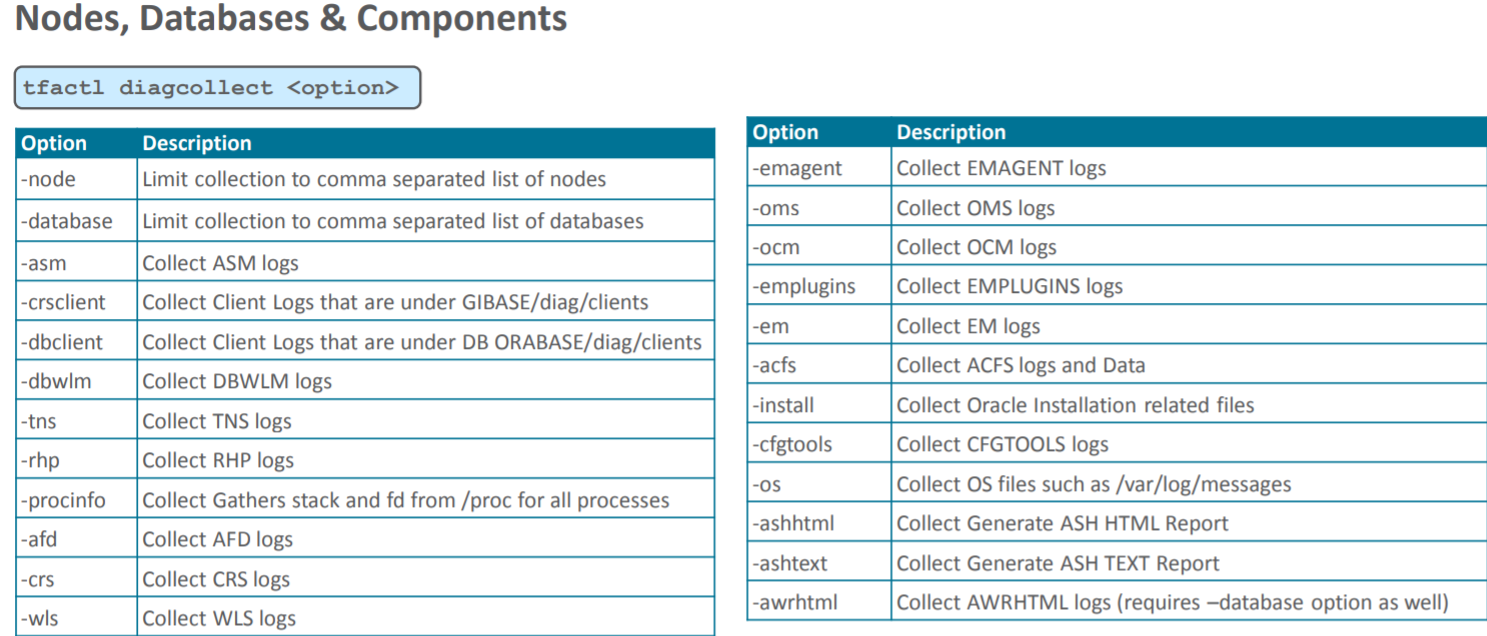
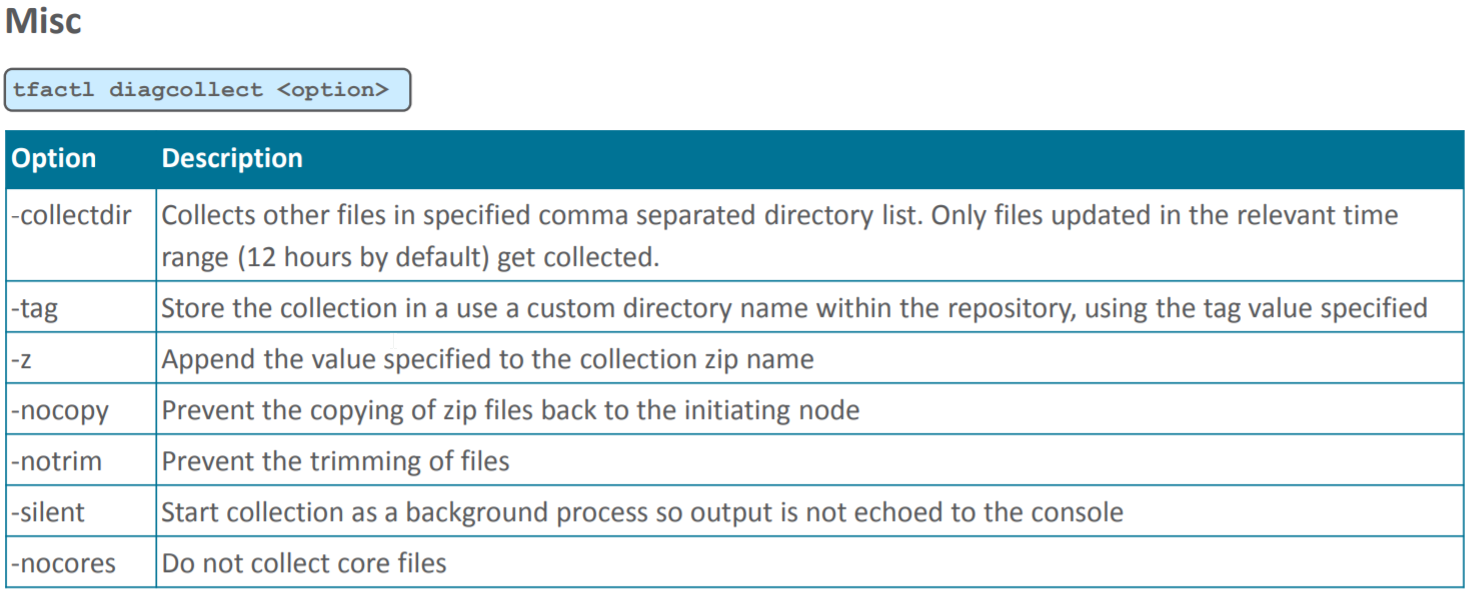
Photos credit : @markusdba
Examples
--- Trim/Zip all files updated in the last 12 hours along with chmos/osw data across the cluster & collect at the initiating node (on-demand diagcollection)  simplest way to capture diagnostics
$ tfactl diagcollect

--- Collecting ASH data for all nodes
$ tfactl diagcollect -ashhtml -database MYDB -last 2m

--- Collecting AWR data for all nodes
$ tfactl diagcollect -awrhtml -database MYDB -last 2m

--- Trim and Zip all files updated in the last 8 hours as well as chmos/osw data  from across the cluster

$ tfactl diagcollect -last 8h

--- Trim/Zip files from DBs hrdb & fdb

$ tfactl diagcollect -database hrdb,fdb -last 1d -z foo

--- Trim/Zip all crs files, o/s logs and chmos/osw data from node1 & node2  updated in the last 6 hours
$ tfactl diagcollect -crs -os -node node1,node2 -last 6h

--- Trim and Zip all ASM logs from node1 updated between from and to time
$ tfactl diagcollect -asm -node node1 -from "Mar/29/2020" -to "Mar/29/2020 21:00:00"

--- Trim and Zip all log files updated on "Mar/29/2020" and collect at the      collect at the initiating node
$ tfactl diagcollect -for "Mar/29/2020"

--- Trim / Zip all log files updated from 09:00 on "Mar/29/2020" to 09:00 on "Mar/30/2020"
 (i.e. 12 hours before and after the time given)
$ tfactl diagcollect -for "Mar/29/2020 21:00:00"

--- Trim / Zip all crs files updated in the last 12 hours.Also collect all files from /tmp_dir1 and /tmp_dir2 at the initiating node
$ tfactl diagcollect -crs -collectdir /tmp_dir1,/tmp_dir2SRDC
For certain types of problems Oracle Support will ask you to run a Service Request Data Collection (SRDC) instead of reading and gathering different data across your system. At the end of the collection the file is automatically uploaded to the SR.
– Syntax : $ tfactl diagcollect -srdc “srdc_type” -sr SR#
- Description of some srdc
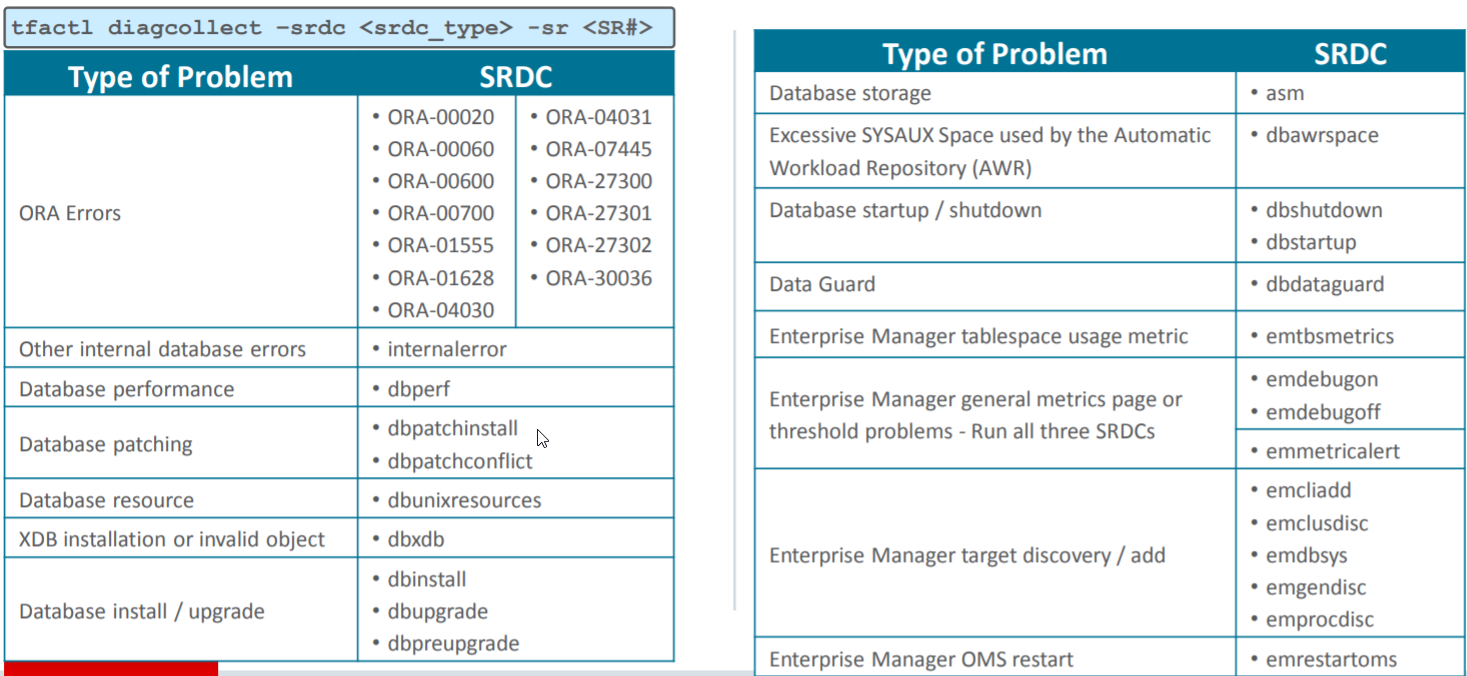
–

Photos credit : @markusdba
Upload diagnostic information to My Oracle Support
Configuration
====================
$ tfactl setupmos
   User Id: JohnDO@email.com
   Password:
  - CERTIMPORT - Successfully imported certificate --will generate generate a wallet
== Run diagcollect for a service request======
$ tfactl diagcollect -srdc ORA-00600 -sr 2-39797576867  -sanitize -mask
==  upload the collected data to MOS
$ tfactl upload -sr 2-39797576867 -wallet <list_of_files>
$ tfactl upload -sr 2-39797576867 -user JohnDoe@mail.com <list_of_files>Note : A full list of SRDC profiles can be checked here.
What’s New in AHF 20.2
- Resource savings through fewer repeat collections. Run below command to limit or stop Oracle TFA collecting the same events in a given time frame.
$ tfactl floodcontrol- Limit TFA to a maximum of 50% of a single CPU use (default is 1, max value can be 4 or 75% of available CPUs, whichever is lower )
$ tfactl setresourcelimit -value 0.5- Easier to upload diagnostic collections. For example to configure ORAchk uploads to be stored in a database you can use:
$ tfactl setupload -name mysqlnetconfig -type sqlnet
Defaults to ORACHKCM user
Enter mysqlnetconfig.sqlnet.password :
Enter mysqlnetconfig.sqlnet.connectstring : (SAMPLE=(CONNECT=(STRING)))
Enter mysqlnetconfig.sqlnet.uploadtable : MYtab- Run all database checks without root password (i.e oracle )
$ tfactl access promote -user oracle
Successfully promoted access for 'oracle'.
$ tfactl access lsusers
.--------------------------------.
|      TFA Users in odadev01     |
+-----------+---------+----------+
| User Name | Status  | Promoted |
+-----------+---------+----------+
| oracle    | Allowed | true     |
'-----------+---------+----------'
@oracle$ tfactl analyze -last 5h  -runasroot